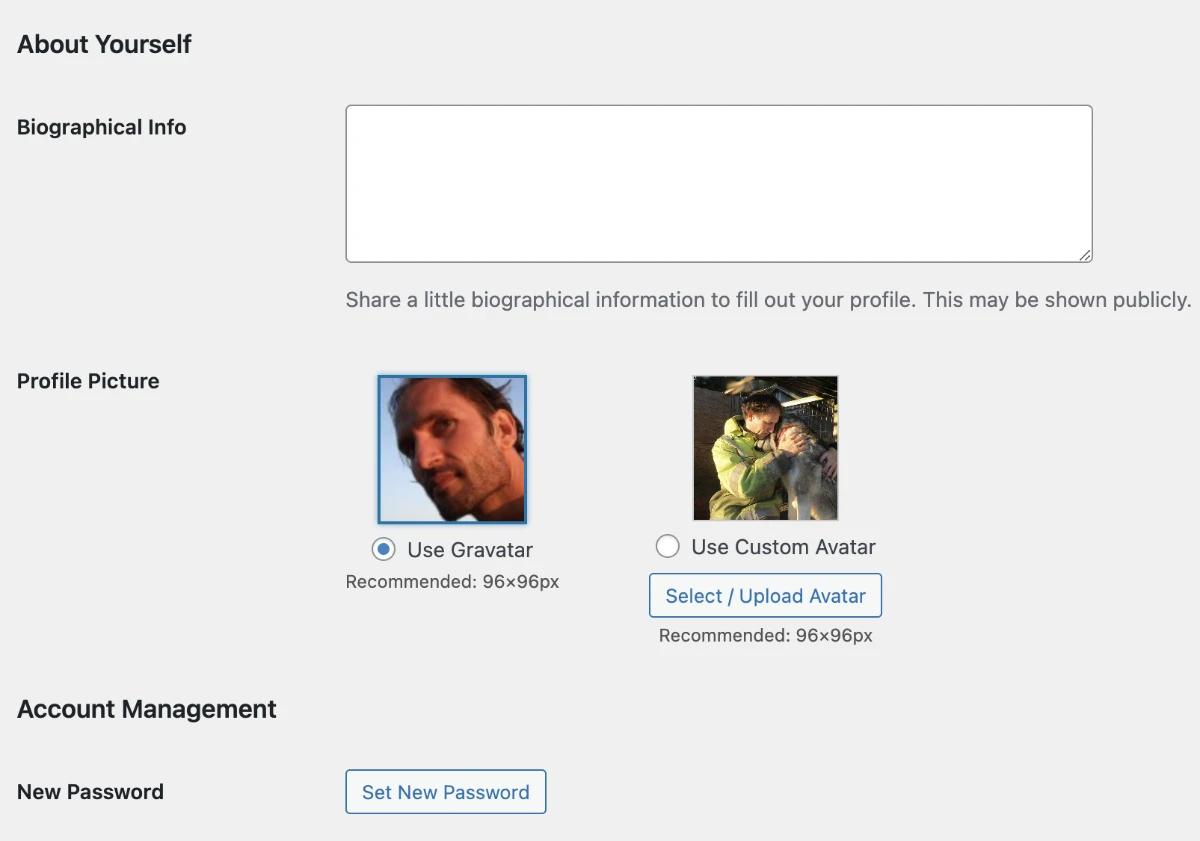
An update of this tutorial showing a code snippet to choose between using a Gravatar or a custom avatar.
/**
 * Two-Image Avatar Selection (Gravatar + Custom Avatar)
 * Fully featured: highlight, hover, recommended size, cropping preview, accessibility
 */

// Enqueue WordPress media scripts
add_action('admin_enqueue_scripts', function() {
    wp_enqueue_media();
});

// Custom CSS for avatar selection, highlight, hover, and accessibility
add_action('admin_head-user-edit.php', 'avatar_selection_styles');
add_action('admin_head-profile.php', 'avatar_selection_styles');
function avatar_selection_styles() {
    echo '<style>
        /* Hide default profile image and description */
        tr.user-profile-picture td img.avatar,
        tr.user-profile-picture td p.description { display: none !important; }

        /* Avatar images styling */
        .avatar-choice-container img {
            width: 96px;
            height: 96px;
            object-fit: cover;
            display: block;
            margin: 0 auto 8px auto;
            border: 1px solid #ccc;
            transition: border 0.2s, box-shadow 0.2s;
            cursor: pointer;
        }

        /* Highlight selected avatar */
        .avatar-choice-container.selected img {
            border: 2px solid #0073aa;
            box-shadow: 0 0 4px rgba(0,115,170,0.6);
        }

        /* Hover effect on selectable avatars */
        .avatar-choice-container img:hover {
            border-color: #0073aa;
            box-shadow: 0 0 4px rgba(0,115,170,0.4);
        }

        /* Center radio labels */
        .avatar-choice-container label {
            text-align: center;
            display: block;
        }

        /* Recommended size note */
        .avatar-size-note {
            font-size: 12px;
            color: #555;
            margin-top: 4px;
            text-align: center;
        }

        /* Optional overlay for non-square images */
        .avatar-choice-container img.unsquare::after {
            content: "Cropped to fit";
            font-size: 10px;
            color: #555;
            position: absolute;
            bottom: 2px;
            right: 2px;
            background: rgba(255,255,255,0.7);
            padding: 1px 3px;
            border-radius: 2px;
        }
    </style>';
}

// Add the avatar selection UI
add_action('show_user_profile', 'two_avatar_selection');
add_action('edit_user_profile', 'two_avatar_selection');
function two_avatar_selection($user) {
    $custom_id  = get_user_meta($user->ID, 'custom_avatar', true);
    $custom_url = $custom_id ? wp_get_attachment_url($custom_id) : '';
    $gravatar   = get_avatar_url($user->user_email, ['size' => 96]);
    $use_custom = get_user_meta($user->ID, 'use_custom_avatar', true) === 'custom' ? 'custom' : 'gravatar';
    ?>
    <script>
    jQuery(document).ready(function($){
        const gravatarUrl = '<?php echo esc_js($gravatar); ?>';
        const customUrl   = '<?php echo esc_js($custom_url); ?>';
        const useCustom   = '<?php echo esc_js($use_custom); ?>';
        const customId    = '<?php echo esc_js($custom_id); ?>';

        const $row = $('tr.user-profile-picture');
        if (!$row.length) return;

        $row.find('td').empty();

        const avatarUI = `
            <div style="display:flex;gap:60px;align-items:flex-start;flex-wrap:wrap;margin-top:10px;">
                <!-- Gravatar choice -->
                <div class="avatar-choice-container">
                    <img src="${gravatarUrl}" alt="Gravatar">
                    <label>
                        <input type="radio" name="avatar_choice" value="gravatar" ${useCustom === 'gravatar' ? 'checked' : ''} aria-checked="${useCustom === 'gravatar' ? 'true' : 'false'}">
                        Use Gravatar
                    </label>
                    <div class="avatar-size-note">Recommended: 96×96px</div>
                </div>
                <!-- Custom avatar choice -->
                <div class="avatar-choice-container">
                    <img src="${customUrl || gravatarUrl}" alt="Custom Avatar" style="${customUrl ? '' : 'opacity:0.4;'}">
                    <label>
                        <input type="radio" name="avatar_choice" value="custom" ${useCustom === 'custom' ? 'checked' : ''} aria-checked="${useCustom === 'custom' ? 'true' : 'false'}">
                        Use Custom Avatar
                    </label>
                    <input type="hidden" name="custom_avatar" id="custom_avatar" value="${customId}">
                    <button type="button" class="button upload-avatar-button" style="margin-top:8px;">Select / Upload Avatar</button>
                    <div class="avatar-size-note">Recommended: 96×96px</div>
                </div>
            </div>
            <p class="description" style="margin-top:10px;">Choose your preferred avatar or upload your own image.</p>
        `;
        $row.find('td').append(avatarUI);

        // Media uploader
        let mediaUploader;
        $(document).on('click', '.upload-avatar-button', function(e){
            e.preventDefault();
            if (mediaUploader) { mediaUploader.open(); return; }

            mediaUploader = wp.media({
                title: 'Select Custom Avatar',
                button: { text: 'Use this image' },
                multiple: false
            });

            mediaUploader.on('select', function(){
                const attachment = mediaUploader.state().get('selection').first().toJSON();
                $('#custom_avatar').val(attachment.id);

                const imgTag = `<img src="${attachment.url}" alt="Custom Avatar" style="width:96px;height:96px;object-fit:cover;display:block;margin:0 auto 8px auto;border:1px solid #ccc;">`;
                $('input[value="custom"]').closest('.avatar-choice-container').find('img').replaceWith(imgTag);
            });

            mediaUploader.open();
        });

        // Highlight selected avatar and update aria-checked
        $('input[name="avatar_choice"]').on('change', function(){
            $('.avatar-choice-container').removeClass('selected');
            $(this).closest('.avatar-choice-container').addClass('selected');
            $('input[name="avatar_choice"]').attr('aria-checked', 'false');
            $(this).attr('aria-checked', 'true');
        });

        // Initialize highlight on page load
        $('input[name="avatar_choice"]:checked').closest('.avatar-choice-container').addClass('selected');
    });
    </script>
<?php
}

// Save avatar selection
add_action('personal_options_update', 'save_two_avatar_choice');
add_action('edit_user_profile_update', 'save_two_avatar_choice');
function save_two_avatar_choice($user_id) {
    if (!current_user_can('edit_user', $user_id)) return false;

    if (isset($_POST['custom_avatar'])) {
        update_user_meta($user_id, 'custom_avatar', intval($_POST['custom_avatar']));
    }

    if (isset($_POST['avatar_choice'])) {
        $choice = ($_POST['avatar_choice'] === 'custom') ? 'custom' : 'gravatar';
        update_user_meta($user_id, 'use_custom_avatar', $choice);
    }
}

// Override avatars on frontend and Users screen
add_filter('get_avatar', function($avatar, $id_or_email, $size, $default, $alt){
    $user = false;

    if (is_numeric($id_or_email)) {
        $user = get_user_by('id', $id_or_email);
    } elseif (is_object($id_or_email) && !empty($id_or_email->user_id)) {
        $user = get_user_by('id', $id_or_email->user_id);
    } else {
        $user = get_user_by('email', $id_or_email);
    }

    if ($user) {
        $choice = get_user_meta($user->ID, 'use_custom_avatar', true);
        if ($choice === 'custom') {
            $avatar_id = get_user_meta($user->ID, 'custom_avatar', true);
            $avatar_url = $avatar_id ? wp_get_attachment_image_url($avatar_id, [$size, $size]) : '';
            if ($avatar_url) {
                return sprintf(
                    '<img alt="%s" src="%s" class="avatar avatar-%d photo" height="%d" width="%d" />',
                    esc_attr($alt),
                    esc_url($avatar_url),
                    intval($size),
                    intval($size),
                    intval($size)
                );
            }
        }
    }

    return $avatar;
}, 10, 5);
Managing your avatar profile image in WordPress.
The default for managing your avatar in WordPress is using a gravatar. This means you need to sign up at gravatar.com and add some avatar images to your new account. The e-mail address you at gravatar.com and for your WordPress sites will link the avatar image from gravatar.com to your sites.
The process is a bit cumbersome for users that just need to make some posts on occasion or need to be a part of a site. So various plugins are created to fix this cap.
An example from WP user Avatars.

https://wordpress.org/plugins/wp-user-avatars/
https://wordpress.org/plugins/wp-user-avatar/
https://wordpress.org/plugins/metronet-profile-picture/
https://wordpress.org/plugins/bp-local-avatars/
https://wordpress.org/plugins/simple-local-avatars/
It is being worked on adding an avatar feature into WordPress so the user can upload and use their own image without having to sign up at gravatar.com.
https://core.trac.wordpress.org/ticket/16020
Resources: